The email industry has been buzzing about the new insights from Google Postmaster Tools v2, especially when it comes to the Compliance Status Dashboard.
As shown in the screenshot below, the Compliance Status Dashboard, according to Google, “shows email sender requirements for your domain and subdomains.”
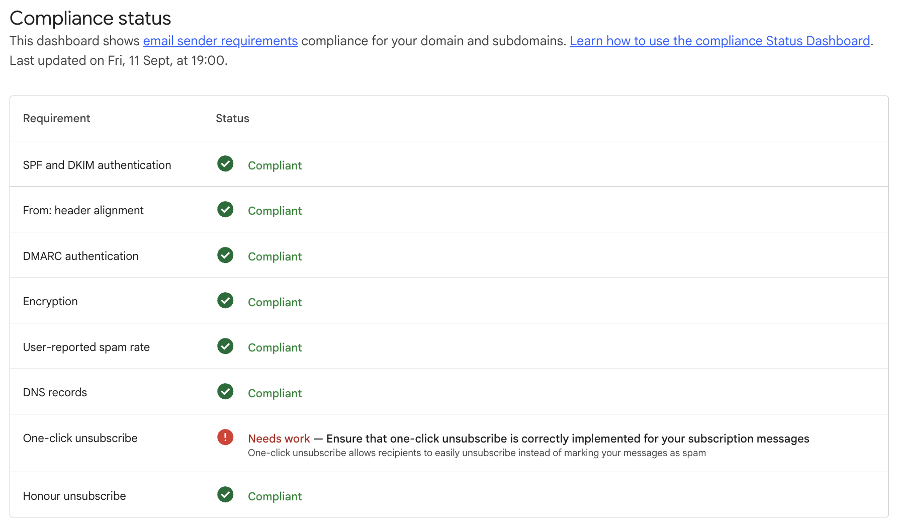
This dashboard has brought up lots of questions from our customers regarding Gmail’s one-click unsubscribe (OCU).
In today’s Ask Monstie advice column, we explain how to troubleshoot OCU and stay compliant with Google’s requirements.
Struggling with an email issue of your own? Submit your question to us, and you may be included in a future Ask Monstie feature.
{{ask-monstie="/blog-ctas"}}
Let’s dive into today’s question:
Hi Monstie,
Why is my sending domain not compliant with Gmail’s one-click unsubscribe requirements? We’re compliant with all other forms of authentication, but we received an error message saying our one-click unsubscribe needs work and isn't correctly implemented. What are we doing wrong? Help!
Thanks, Compliance Confusion
This is a common issue, Compliance Confusion, so there’s no need to spiral from stress. We’ll walk through the top reasons why your domain may be flagged as noncompliant.
But first—let’s take a step back to understand why Google wants senders to add one-click unsubscribe.
Unsubscribes: Your Protection Against Spam Complaints
On the spectrum of negative actions that email recipients can take, mailbox providers and marketers alike would much rather deal with unsubscribes than spam complaints.
Unsubscribes are a yellow light. A user doesn’t want to hear from you, but that doesn’t necessarily reflect a brand’s wrongdoing.
Spam complaints, however, are a bright red light. Not only does a user never want to be contacted again, but they also believe you have infiltrated their inbox through nefarious means.
Google’s one-click unsubscribe (OCU) allows users to easily unsubscribe, rather than marking a brand’s messages as spam forever. This is a much better option for your domain reputation.
You can find the OCU feature directly in the Gmail inbox without having to navigate to the footer of the email and find the unsubscribe link in the fine print. OCU offers users a shortcut, making it quick and painless to say goodbye to brands.
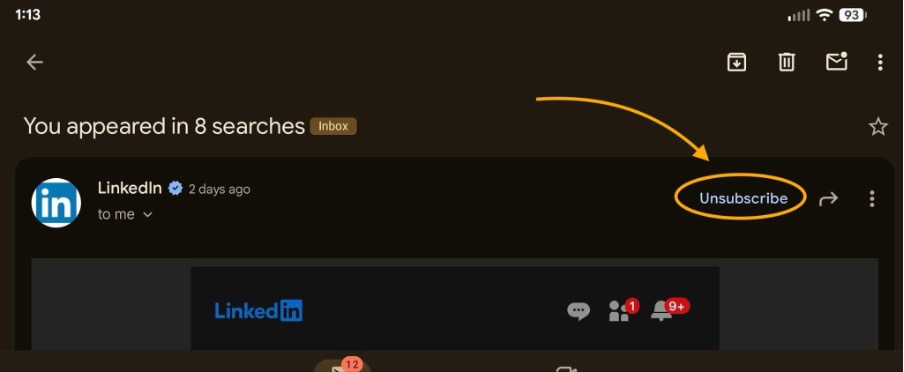
You will also notice this feature appears when you attempt to mark a message as spam. If the OCU mechanism is present, Google will prompt users to opt out instead of marking messages as spam.
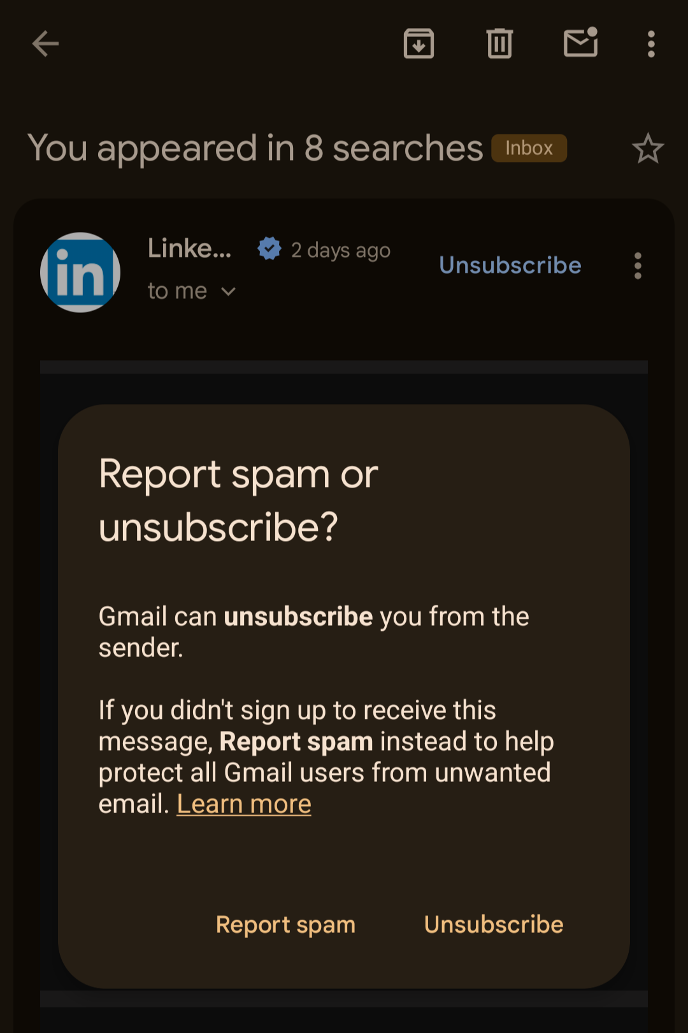
Note that you still have to include the Unsubscribe link in the body of the email to be CAN-SPAM compliant. This unsubscribe can still link out to a preference center. Multiple clicks are okay in this scenario.
Pro Tip: Using a single-click unsubscribe in the body of your email is not recommended. Because security scans crawl and click your emails, you don’t want a single click to accidentally opt a user out.
4 Reasons You’re Not Compliant With One-Click Subscribe
Now that you’re familiar with OCU as a feature, let’s discuss the most common reasons why you may not be compliant.
Reason 1: One-click unsubscribe is simply not present.
Google has required OCU since 2024, but the feature is not turned on by default. If you’re sending marketing or promotional emails to over 5,000 recipients per day, you should prioritize implementing it as soon as possible.
Thankfully, this should be an easy fix within your email service provider (ESP). Review Google’s email sender guidelines to set up one-click unsubscribe for Gmail messages.
Reason 2: One-click unsubscribe isn’t present on all your marketing emails.
Ensure that all your marketing and promotional content includes the OCU feature. You may be implementing it for your weekly newsletters or mass campaigns, but don’t forget to audit your automated journeys and 1:1 message triggers to make sure they include it too.
There might be a gap in your program where marketing emails are deploying without the OCU option, so investigate all communications to ensure full coverage.
Reason 3: One-click unsubscribe is present, but not functioning as expected.
If OCU is present on all your emails, you might need to work with your ESP to ensure it’s working properly.
Check these requirements below:
- List-Unsubscribe header is present with the “HTTPS” URL. The List-Unsubscribe header must contain at least one valid, secure https:// endpoint URL. It can also include a secondary mailto: address for legacy support.
- List-Unsubscribe-Post: List-Unsubscribe=One-Click. List-Unsubscribe-Post: List-Unsubscribe=One-Click: This exact header name and value pair must be present. It signals to a mailbox provider like Gmail that the server supports a background POST request.
- Both OCU header fields should be covered by the domain DKIM signature. Both the List-Unsubscribe and List-Unsubscribe-Post headers must be included in the h= tag of the DKIM signature. This prevents man-in-the-middle attackers from modifying or stripping the unsubscribe endpoints during transit.
- HTTPS endpoint must accept HTTP POST requests. The HTTPS URL defined in the header must be configured to process a raw HTTP POST request sent by the receiving mail client without requiring user auth or login.
- POST triggers an immediate unsubscribe (no confirmation required). Receiving an HTTP POST request to that endpoint must immediately perform the unsubscribe action on the back end. It cannot redirect the user to a secondary landing page or demand a manual confirmation click from the recipient.
- The subscriber is removed within 48 hours. Mailbox provider requirements mandate that once an unsubscribe request is received via RFC 8058, the sender must process the removal and stop sending promotional messages to that address within 48 hours.
Reason 4: My emails are transactional, so they don’t require one-click unsubscribe.
While this is technically true, Google doesn't police what is transactional or not. If Gmail sees high complaints from a transactional mail stream and no OCU option is present, it will likely mark your domain as noncompliant.
A high number of complaints on a transactional send is not a good sign. Typically, subscribers understand why they are receiving transactional emails, and they don’t cause many complaints. If you’re seeing high complaints on transactional emails, you’ll need to correct this.
The Google Feedback Loop (FBL) data is very helpful for identifying campaigns with higher user spam complaints. Use the FBL data to pinpoint these campaigns and learn why your subscribers are marking them as spam.
If your transactional email is falling into a gray area between transactional and marketing, you might need to reclassify it as marketing / promotional (with OCU present), just to be safe.
Clearing Up Compliance Confusion
If you’ve troubleshot the four reasons listed above and are still running into OCU issues, here are additional resources:
- Google: Email sender guidelines
- Suped: How does Gmail's one-click unsubscribe work, and is it really one click?
- Valimail: One-click unsubscribe: What it is, how it works & compliance
- GlockApps: RFC 8058 Explained: How One-Click Unsubscribe Works
- Spam Resource: One-click unsub confusion: Let's clarify!
Tutorials like these are a great place to start, but if you want hands-on support, Inbox Monster’s expert deliverability services can guide you step by step.
Our deliverability consultants can help you navigate the nuances of Gmail and other mailbox providers, as well as offer assistance with the following:
- DMARC and authentication
- IP warming
- Blocklist and spamtrap remediation
- Proactive monitoring
- Sending strategy
- Email engagement best practices
In addition to serving as an extension of your email team, Inbox Monster’s deliverability platform provides full visibility into inbox placement and performance.
Book a demo of Inbox Monster to see our email deliverability tools in action.
Got a question for the Inbox Monster team? Submit this form, and you may find it featured in a future Ask Monstie column!
{{closer-look="/blog-ctas"}}