
Many email folks find themselves puzzling over their reputation at the big mailbox providers. Love it or leave it, we need to have a strong relationship with them.
But reputation isn’t a specific metric, like complaint rate or inbox placement. There is no single deliverability score across ISPs. Gmail, Yahoo, Outlook and the like evaluate reputation differently and enforce their own sender rules, so monitoring your domains and IPs at each provider requires a comprehensive approach. Reputation then becomes a holistic measure of program performance, rather than a single figure.
This doesn’t mean reputation can’t be tracked and improved upon. This ISP deliverability guide will explain what you need to know about Google Postmaster Tools, Yahoo Sender Hub and Microsoft SNDS—and how Inbox Monster brings reputation monitoring into one view.
Because the more you understand how each ISP grades reputation, alongside other deliverability data, the better you’ll be at interpreting signals and reacting when your reputation status changes.
No One Reputation Metric to Rule Them All
Wouldn’t it be nice if there was a rulebook on when you should check in on a relationship? A simple number that told you how it was going?
Sadly, there is no universal metric to track reputation, much to the dismay of deliverability consultants everywhere. Google, Yahoo and Microsoft each run their own reputation evaluation and maintain their own tooling, which is why a sender can land in one inbox while sliding into spam at another.
The exception is coordination on baseline rules: Gmail and Yahoo worked together to announce the 2024 bulk sender requirements as a shared standard, even though the two providers still evaluate senders independently.
Underneath the differences, every provider weighs the same two things:
- The first is authentication and identity: Are you who you say you are?
- The second is recipient behavior: How are people engaging with your messages? This covers everything from how often your mail is marked as spam to whether your sends are landing on addresses that shouldn't exist.
Those inputs are shared across ISPs. What differs is how each evaluates them and how much of the result it shows you as the sender.
Blocklists are a separate signal, and most carry limited weight with the major mailbox providers. Spamhaus is the notable exception—one blocklist that does factor meaningfully into reputation at Gmail, Yahoo and Outlook. That’s why Inbox Monster includes Spamhaus domain reputation data in our reputation scoring.
Sender Requirements at Gmail, Yahoo and Outlook
Each mailbox provider evaluates reputation differently, but every bulk sender—that is, a business that sends more than 5,000 emails per day—has to meet the shared baseline that Google and Yahoo formalized in 2024 and that Microsoft broadly mirrors.
Here are some of those baseline sender requirements:
- Authentication must be in place. SPF, DKIM and DMARC all need to be set up for your sending domain. Your DMARC enforcement policy can be set to none, but one needs to be established.
- One-click unsubscribe (OCU) should be implemented for all marketing emails. Have you received an error message and need help troubleshooting OCU? Read our expert advice on staying compliant.
- Keep spam rates below 0.3%. Google's guidance is to stay below 0.3%, with 0.1% as the real target. Postmaster Tools' newer Deliverability analysis panel actively flags a spam rate above 0.1% as a warning, so consider that the operating limit, not a nice-to-have.
Gmail lists other requirements related to PTR records, TLS connections, Internet Message Format standards, From: header impersonation and more. Make sure to review all sender guidelines so you don’t miss any.
That said, meeting this baseline gets your mail considered, but it’s just the beginning to earn inbox placement. In the next sections, we dive deeper into how each ISP monitors deliverability, as well as how you can gain a bird’s-eye view in a platform like Inbox Monster.
How Reputation is Reported in Google Postmaster Tools
At Gmail, your instrument panel is Google Postmaster Tools (GPT), now delivered through the v2 Compliance Dashboard.
The transition from v1 to v2 has been a long one, from Google’s announcement of the deprecation in October 2025 to its postponement and eventual sunsetting in August 2026. The Inbox Monster team has stayed up-to-date on the changes, and now Reputation reporting in the platform has been redesigned to factor in all the data points from GPT v2.
The biggest change has been Google retiring its reputation bands. Instead of grading on High/Medium/Low/Bad, GPT is now providing specific reasons for a poor deliverability status verdict, which could include:
- Low message volume
- High delivery errors
- Noncompliance with sender requirements
- High spam rates
- Low or negative user feedback
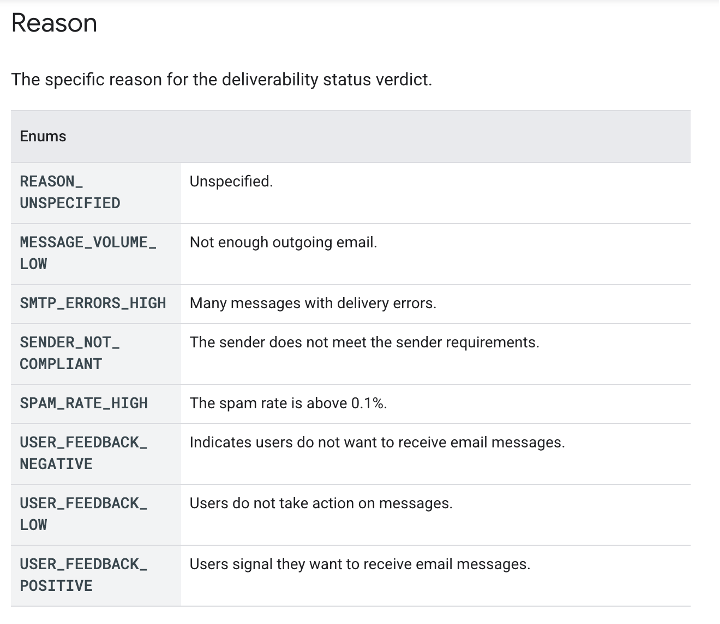
This is precisely why reputation isn’t a single KPI, but rather a comprehensive understanding of a sender’s practices. If a brand turns that verdict around, the result will be a better reputation.
Deliverability Monitoring at Yahoo
Yahoo, along with AOL on the same infrastructure, enforces the same 2024 baseline as Gmail and puts real weight on how recipients engage with your mail. But just because Yahoo and Gmail jointly partnered on sender guidelines doesn’t mean your placement will be the same in both inboxes.
Here’s what to keep in mind with Yahoo:
- Meet the 2024 sender requirements: It’s worth reiterating to align SPF, DKIM and DMARC, enable one-click unsubscribe and keep complaint rates below 0.3%.
- Enroll in Yahoo's Complaint Feedback Loop (CFL), so Yahoo spam reports route back to you, tied to your DKIM signing domain. This is your direct line into how Yahoo recipients are reacting to your mail.
- Use Yahoo's Sender Hub for current best practices, requirement checks and support requests.
- Watch engagement, not just complaints. Yahoo reads positive and negative engagement signals closely, which means list hygiene and sunsetting inactive subscribers do more work here than a clean complaint rate alone.
Monitoring Outlook With Microsoft SNDS
Microsoft is often considered the hardest of the three to gain visibility into, giving many senders grievances. Because Microsoft publishes less than Google or Yahoo when it comes to deliverability, the key is turning on the two data sources it does offer and monitoring them with an inbox placement testing platform.
- Request SNDS access (Smart Network Data Services) for your sending IPs. Access is keyed to the IP, so you request it per IP range. Note that Microsoft recently moved SNDS to a new home; make sure your team is pointed at the current dashboard.
- Monitor SNDS signals, such as message volume, complaint rate and High/Medium/Low reputation bands. A rising complaint rate is the early signal to act on. Microsoft does not publish exact numeric cutoffs, so read the bands qualitatively and track the direction of travel.
- Enroll in JMRP (Junk Mail Reporting Program) so Outlook.com junk reports flow back to you as a feedback loop. This is the closest thing Microsoft gives you to a complaint feed.
Because Microsoft shows less than Google and Yahoo, email teams do not rely on any single Outlook dashboard. They lean on SNDS, JMRP and inbox placement testing in combination. That’s where a robust deliverability platform comes in.
Bringing Reputation Reporting Into One View
Here’s the thing: Nobody wants to chase down multiple dashboards to understand how their email program is performing at a high level. Because reputation isn’t a single KPI and requires keeping an eye on several metrics at once, it’s difficult to know what to watch out for.
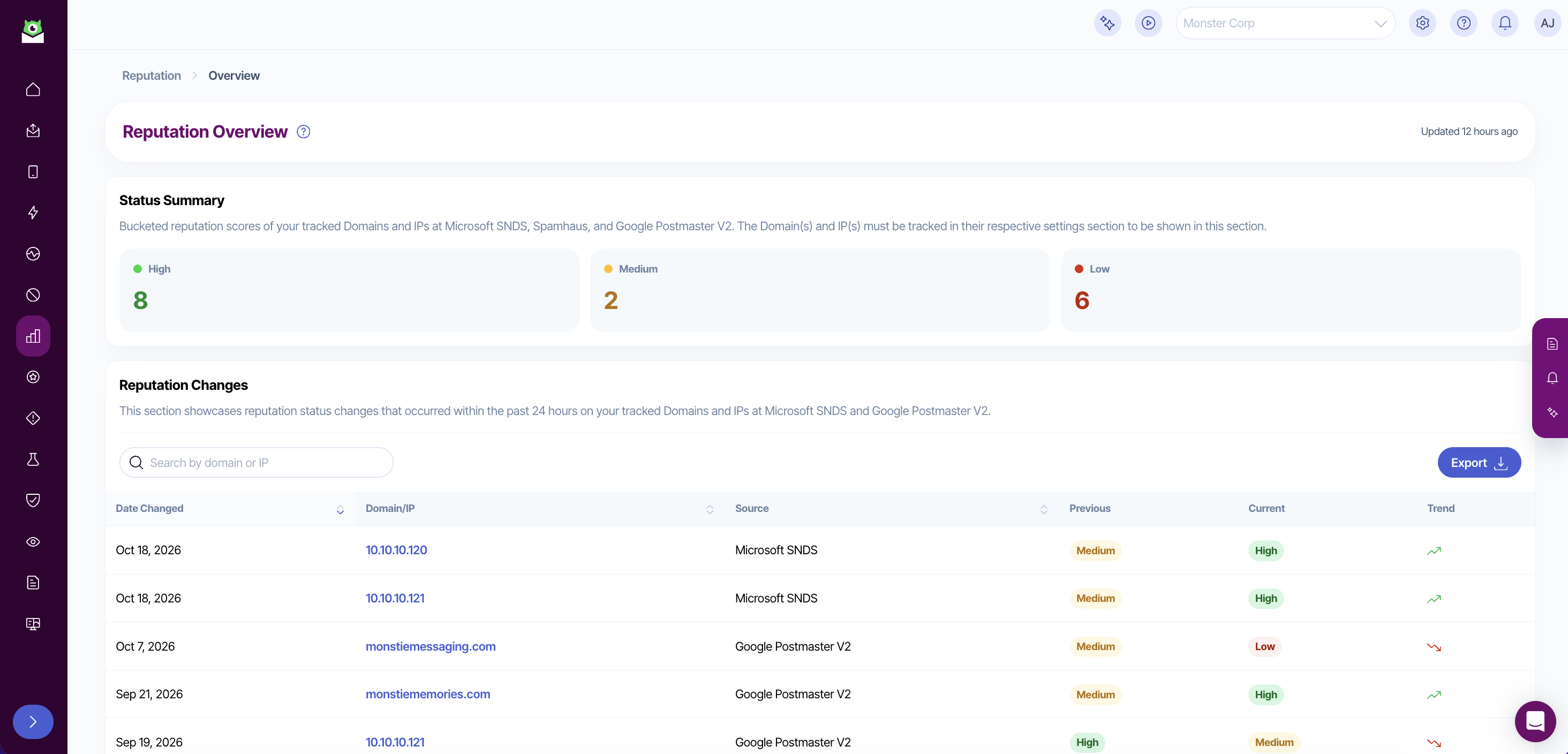
This is where Inbox Monster's Deliverability Suite does the correlation for you. It pulls Google Postmaster Tools, Microsoft SNDS and Spamhaus data into the same reputation reporting dashboard, displaying any status changes that occurred within the past 24 hours and showing the exact source of the change.
And now that reporting has been redesigned to include GPT v2, you can access a single, consistent reputation grade across Google, Microsoft and Spamhaus, with much deeper Gmail diagnostics than could be surfaced before.
By combining all sources, Inbox Monster enables a complete picture:
- A three-band High/Medium/Low reputation scale with Microsoft SNDS and Spamhaus grades mapped directly onto it.
- Domain-level view of reputation band and rolling daily reputation trend, as computed by Inbox Monster and sourced from GPT v2 signals. This view also includes Google’s sender requirement compliance status and Deliverability analysis.
- IP-level view (sourced from Microsoft SNDS) of current reputation grade, average inbox placement at Outlook, average complaint rate, with day-by-day tables you can filter and export.
- AI summaries for each domain drilldown that read the underlying data and tell you what’s actually going on.
What to Do When Inbox Placement Drops at an ISP
When inbox placement drops at any one ISP, your overall sender reputation will take a hit. The first move is to isolate which provider, because a Gmail dip and an Outlook dip usually have different causes and different fixes.
- Confirm the provider(s). Placement data broken out by ISP tells you whether the issue is limited to one or affecting them all.
- Identify the root cause. ISP feedback loops can help you isolate the campaigns that are generating high complaints.
- Correlate with what changed: Investigate what might be behind those problem campaigns, such as spamtrap hits, volume/frequency changes or poor data capture practices.
- Remediate, then verify recovery at that specific provider before you move on. Tools like Inbox Monster’s Subscriber Insights allows you to see which ISPs make the biggest impact on your list, so you can act accordingly.
Need more guidance? Check out the 10 questions to ask yourself to repair your sender reputation.
Protect Your Reputation With Inbox Monster
Reputation means different things to each mailbox provider, but you can piece together the entire puzzle with Inbox Monster.
Inbox Monster’s Deliverability Suite tracks all critical metrics in one place and alerts you immediately when issues arise. Hundreds of leading brands rely on our expert tools, built for email people.
- 90 mail systems monitored worldwide, including Gmail, Yahoo and Outlook.
- 6 billion spamtrap hits monitored monthly across Inbox Monster's network.
- Up to a 30% increase in inbox placement within 30 days of standing up the Deliverability Suite, compared with running without a monitoring platform.
Inbox Monster integrates with the ESPs that enterprise teams already use, including Salesforce Marketing Cloud, Iterable, Braze and Twilio SendGrid. And our expert services offer proactive support on authentication, spamtrap and blocklist remediation, sending strategies and so much more.
It's that one-on-one dedication that led Yankee Candle's email program to 100% Outlook inbox placement across Newell's U.S. brands in six weeks. Now, their foundation is solid and their audience stays clean and engaged.
If you'd like to learn how Inbox Monster monitors reputation in one view across ISPs, talk to an email expert and see the Deliverability Suite in action.
{{expert="/blog-ctas"}}
FAQs About ISP Deliverability and Reputation Reporting
How do I check my sender reputation at Gmail, Yahoo and Outlook?
Each mailbox provider has its own dashboard: Google Postmaster Tools for Gmail, Yahoo's Sender Hub and Complaint Feedback Loop for Yahoo, and Microsoft SNDS for Outlook. But a deliverability platform like Inbox Monster can monitor sender reputation at a higher level, incorporating multiple views and providing real-time monitoring and alerts when inbox placement drops.
What is a good spam complaint rate?
Keep it below the threshold Google and Yahoo advise. Their sender guidelines require a rate under 0.3% and ideally under 0.1%. Any upward spike is an early warning worth acting on immediately.
What are the 2024 Google and Yahoo sender requirements?
Among these joint requirements, effective as of February 2024, included aligned SPF, DKIM and DMARC authentication, one-click unsubscribe for marketing mail, and a capped spam complaint rate of 0.3% for bulk senders.
How often should I monitor my reputation at each ISP?
Continuously. A monitoring program surfaces a reputation drift at any one provider the moment it appears, rather than in your next manual check, which is often too late. Reputation management comes standard in Inbox Monster’s Deliverability Suite.
Why doesn’t Inbox Monster include Yahoo Sender Hub in its Reputation reporting?
The Yahoo Sender Hub dashboard is relatively new, having launched in 2024. Currently, Yahoo does not provide an API to route data into the Inbox Monster platform. We will continue to stay abreast of all ISP updates and aim to offer the greatest visibility into deliverability data that’s available.