Email marketers have so many items on their to-do lists: build that automation for their next campaign, report on performance to leadership, fix that blasted Outlook issue once and for all. With all that work stacked precariously high on their plates, we’re not surprised that one task keeps getting deprioritized.
Yep, we’re talking about BIMI.
In this post, we’re joining forces with our friends at Iterable, who recently shared how to stand out from the noise at this year’s Activate Summit in Los Angeles.
We’ll discuss:
- Why BIMI is so important to strengthening brand trust
- What are the most challenging obstacles to implementing BIMI
- How to move from indecision to action and get started today
You’ll walk away with the confidence to turn that little logo into a big impact.
What Is BIMI?
It may seem like BIMI has been around forever, but the BIMI working group wasn’t formed until 2019. The standard has only been established since 2021.
This working group defines BIMI as such:
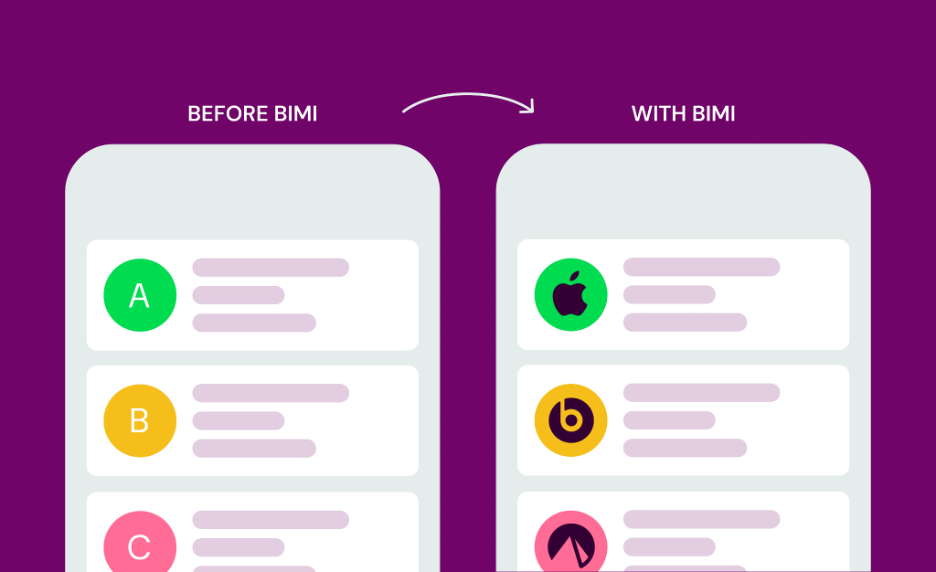
Brand Indicators for Message Identification or BIMI (pronounced: Bih-mee) is an emerging email specification that enables the use of brand-controlled logos within supporting email clients. BIMI leverages the work an organization has put into deploying DMARC protection, by bringing brand logos to the customer’s inbox. For the brand’s logo to be displayed, the email must pass DMARC authentication checks, ensuring that the organization’s domain has not been impersonated.
Put simply, if you want your brand’s logo to display in the inbox, that’s where BIMI comes in. But why is BIMI essential in email marketing?
The Benefits of BIMI
According to Tom Corbett, Senior Deliverability Consultant at Iterable, 392 billion emails are sent every single day, but only 8% of them are delivered to the inbox. 90% are rejected by ISPs outright, and 2% are sent to spam.
That said, Tom was quick to assert, “Deliverability is not a problem to solve. It’s a reputation you earn.” Brands must go beyond the bare minimum requirements—like setting up SPF and DKIM—to reach their audiences.
BIMI provides a huge opportunity to differentiate from the competition. In fact, when Iterable dug into the data, the team found that only 3% of the retail domains they analyzed had implemented BIMI.
Here’s why BIMI makes a big difference:
- Brand recognition: BIMI is like having a billboard for your email program. It displays your verified brand logo in supported inboxes, the largest of which are Gmail, Yahoo and Apple Mail. That covers the vast majority of consumers. BIMI is the ultimate signal of a credible sender.
- Enhanced email security: BIMI uses email authentication to ensure the legitimacy of your emails and prevent phishing and spoofing. In an era where it can be difficult to determine who’s real online, BIMI makes it harder for bad actors to impersonate your brand.
- Trust and credibility: A verified BIMI logo helps recipients recognize trusted brands, boosting credibility and email performance. Studies have shown that BIMI implementation can lead to a 39% increase in open rates, 32% higher purchase likelihood and 120% improvement in brand recall. This increased trust sends positive signals to mailbox providers for improved deliverability and a better reputation.
What’s Standing in the Way of Brands Implementing BIMI
If BIMI has so many benefits, then why have most businesses not implemented it, even five years after the standard was established?
Like many things we tend to procrastinate on, it often comes down to time and money. Let’s walk through each of these obstacles and offer tips for tackling them.
The Cost
While BIMI is free to implement at certain mailbox providers, like Yahoo, certification is an added cost. A CMC (Common Mark Certificate) or VMC (Verified Mark Certificate) is required by certain providers, like Gmail, and will run between $1,000 and $1,500 annually.
While a trademarked logo isn’t required for a CMC, it is for a VMC, which can add a few hundred to thousands of dollars in filing and legal fees.
These expenses can be a burden for small businesses, but the reality is that it’s likely still cheaper than an effective Google Adwords campaign. It’s also worth noting that deliverability directly impacts revenue. Considering how much BIMI can positively impact an email program, it’s worth paying to strengthen your sender reputation.
Pro tip: If upper management balks at the cost of certification, compare it to the ROI your brand would achieve if purchases increased by 30%+ with BIMI.
The Resources
Let’s face it: If BIMI were as easy to implement as flipping a switch, more companies would have done so by now. Much like email authentication in general, BIMI takes time and effort to make happen. It requires partnering with IT and other departments that aren’t familiar with the email ecosystem.
Because BIMI involves a certain amount of submitting and waiting and jumping through a few hoops, it’s not uncommon for things to slip through the cracks. That’s why we recommend not delaying the process, instead incorporating BIMI as part of your overall onboarding.
Pro tip: With the right team by your side, BIMI is low-hanging fruit, not an overwhelming ordeal. A good deliverability partner can help you prioritize implementation before the rest of your to-do list takes over.
{{expert="/blog-ctas"}}
How to Get Started With BIMI
The BIMI working group has a great implementation guide as a reference, but here’s a quick overview.
4 Steps to Standing Up BIMI
- Authenticate with SPF, DKIM and DMARC. DMARC policy for root domain and subdomains must be set to p=quarantine or p=reject to ensure SPF and DKIM are aligned. P=reject should ultimately be the goal, but if you don’t have a DMARC policy in place, start with p=none, add your RUA tag to monitor reports for several weeks, then change the policy to quarantine, and then to reject. This ensures all email traffic at the root and subdomain level is fully authenticated.
- Produce an SVG Tiny PS version of your logo. Mailbox providers are very particular about their requirements, so be sure to study each in detail. Here is a detailed guide on Google’s specifications, and the working group has more information on creating logo files.
- Acquire a CMC or VMC for your logo. This is optional, given the cost involved, but highly recommended. A VMC verifies you with a blue checkmark but requires a registered trademark. A CMC is a good alternative if your trademark isn’t registered and you need a more affordable option. Here is a list of mark certificate issuers with more information.
- Publish a BIMI record for your domain in DNS. This step is usually initiated by your email service provider and/or IT team. Here are resources to generate your BIMI record and validate it.
Comparing BIMI and Apple Business Connect
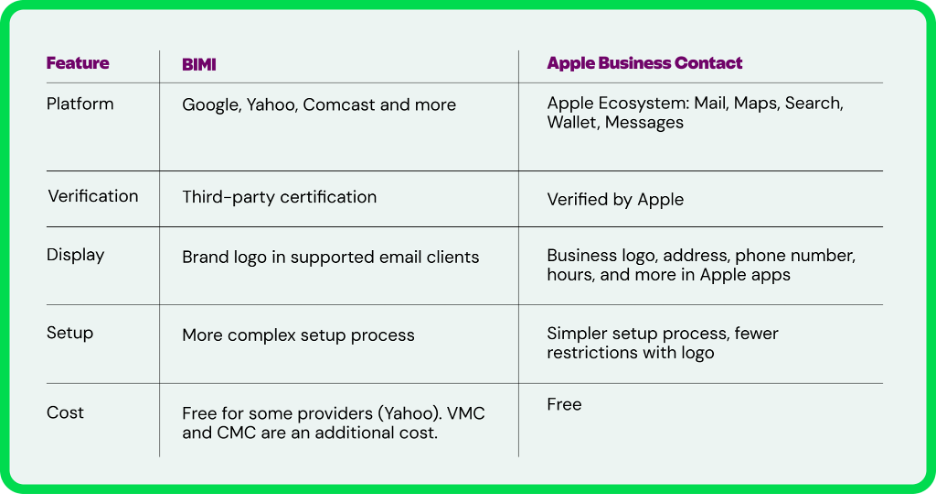
Like BIMI, Branded Mail through Apple Business Connect lets business owners add a brand logo to their emails so they stand out in the Mail app on Apple devices and iCloud Mail on the web. The benefits mirror those of BIMI, including increased customer trust, enhanced email security and better brand recognition across Apple’s ecosystem.
Here are the key differences between BIMI and Apple Business Connect.
You Need a BIMI Bestie
To drive the point home, consider this: Your customers wouldn’t enter a half-finished store. So why are you sending email without BIMI?
A powerhouse deliverability team—whether at a customer engagement platform like Iterable or an independent provider like Inbox Monster—can guide you through email authentication and BIMI implementation.
With Inbox Monster at your side, you also gain access to DMARC and our Deliverability Suite, which enables inbox placement, reputation management and real-time monitoring of blocklists, spamtraps and more.
To learn more about building trust with your email identity, check out Iterable’s deliverability session at Activate Summit.
Want to become BIMI BFFs? Contact our team of email experts to get started.
{{deliver-more="/blog-ctas"}}
FAQs About BIMI
Which mailbox providers support BIMI?
Popular mailbox providers that support BIMI include Google, Yahoo, Comcast, and Apple. At this moment, Microsoft does not support BIMI. You can reference the BIMI working group for the current list of providers.
Can I use multiple logos with BIMI?
Yes! If you want to use multiple logos on a single domain, you now have two ways to set it up:
- The DNS Method (lps tags): This is the newest way to do it. By adding a Local-Part Selector (lps=) tag directly to your main BIMI DNS record, you can tell mail servers to look at the prefix of your email address (like news or support) and dynamically fetch a different logo file automatically.
- The Header Method (BIMI Selectors): This is the traditional approach. It requires your email service provider to inject a unique BIMI-Selector header into the hidden metadata of your outgoing email streams to specify which logo to display.
Keep in mind that regardless of which method you choose, each unique logo typically requires its own Verified Mark Certificate (VMC) to display properly in strict inboxes like Gmail.
For a deep dive into setting up headers, read the BIMI Group Guide to Selectors. For the technical specifications on the new lps tag, review the official IETF BIMI Draft Documentation.
Why is my logo not showing up?
Some mailbox providers, such as Yahoo, accept a self-asserted BIMI record, meaning they may display your logo without certification. However, Gmail and other providers require that BIMI logos be verified with a VMC. You can refer to the BIMI working group’s FAQs to troubleshoot.
Do I need a positive sender reputation for my BIMI logo to display?
According to the BIMI working group, “Each participating mailbox provider determines where BIMI logos show up in their applications, and they can choose not to display your logo if they think your reputation is questionable or your brand doesn’t meet their requirements for participation.”
Yahoo and Google both confirm that a sender must pass authentication and anti-abuse checks and demonstrate sufficient reputation and engagement for a logo to display.
How many VMCs do I need?
You will need one VMC per logo per domain, including any subdomains that use the same logo. If you have two different logos, you will need two VMCs. However, if you have one logo but two or more distinct domains using the same logo, some providers offer multi-domain VMCs with SAN extensions, which can reduce costs compared to purchasing two separate VMCs. This resource from DigiCert can help guide your decision.
What is the avp tag?
A new addition to the BIMI standard, the avp (Avatar Preference) tag sets the display preference, allowing brands to control which logo their recipients see. The BIMI working group explains the two avp tag values and why it matters for businesses.