Email marketers know that every send is a moment of truth. One broken link, distorted image or overlooked error can undermine weeks of planning and damage customer trust.
Inbox Monster’s whole mission is to end the sending scaries. Our Creative Suite gives email teams all the essential tools they need to catch issues before they happen.
And now the Creative Suite is available entirely self-service.
Sending with confidence just got so much easier.
The Self-Service Creative Suite: Built for Email Teams
Inbox Monster’s Creative Suite was designed to give email teams a better way to test, preview and perfect their messages. Whether you’re sending a handful of campaigns a week or managing a high-volume, multi-brand program, the suite can scale to the size and scope of your business.
Now, Creative Suite is just a credit card swipe away. Simply select a plan and get instant access—no contracts, sales calls or complex onboarding required.
“The email community has been looking for an innovative, flexible tool for email testing. Inbox Monster’s self-guided version of our Creative Suite allows teams to choose the plan that fits their needs and get started instantly.” ~ Matt McFee, Managing Director at Inbox Monster
Want to know which Creative Suite plan is right for you? Here’s a brief breakdown of our three offerings.
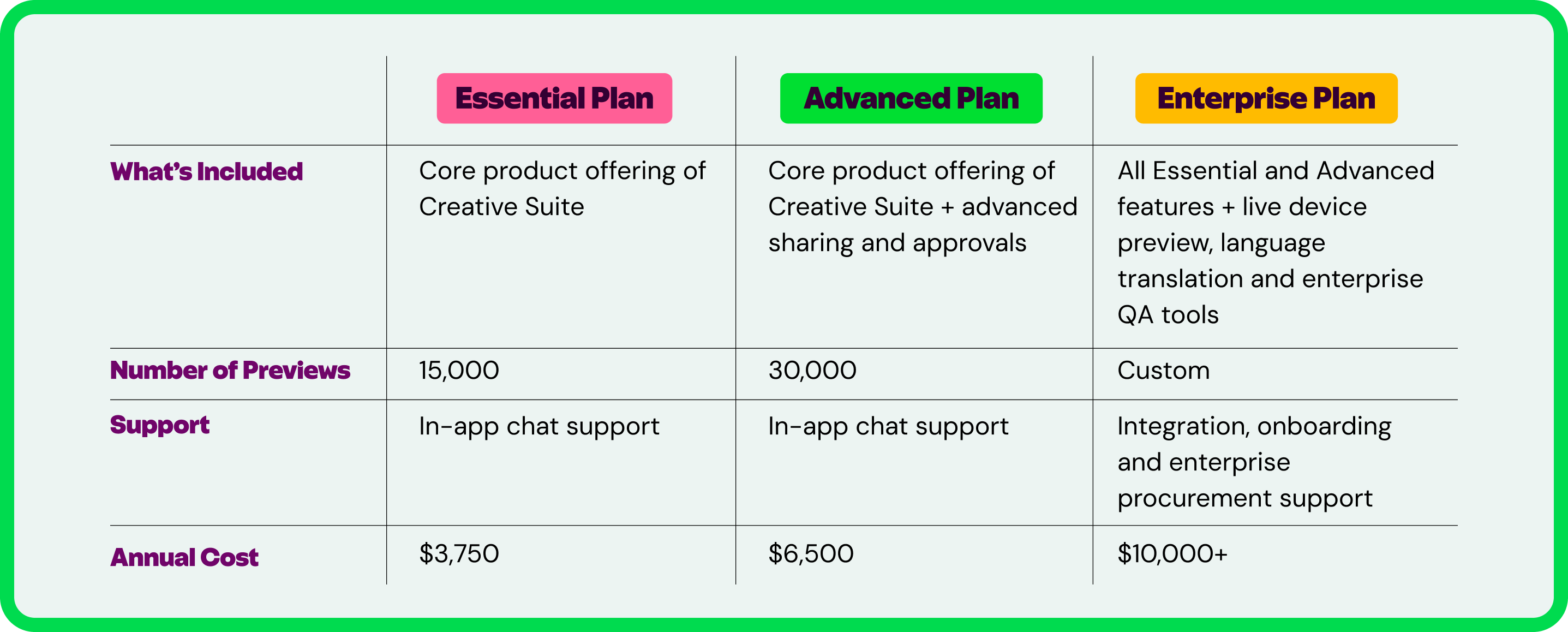
No matter what your company’s size or industry, there’s a Creative Suite plan for you:
- We recommend Essential plans for smaller teams looking to manage steady campaign volume and maximize email impact.
- Advanced plans are for expanding email programs with higher volume and collaboration needs.
- Enterprise plans are for mature programs running frequent campaigns across brands, teams or business units.
Regardless of what plan you choose, you gain access to all the core features in our Creative Suite. Let’s walk through what’s included.
What’s Included in the Creative Suite
Inbox Monster’s Creative Suite ensures every email looks as good in the inbox as it did in your design. Here’s what you can expect from this flexible, robust rendering platform:
- Gain powerful team QA & collaboration tools. Say goodbye to static spreadsheets and endless back-and-forth with proofing and approvals created for modern email teams.
- Access all major previews for essential email rendering. Know how your emails show up in 110+ modern clients and devices—including dark mode—so you never send a broken message.
- See how AI interprets your emails with AI summaries. AI summaries are your new first impression. Learn how your emails will be read by Google’s Gemini, Microsoft Copilot and Apple Intelligence before you press send.
- Check every link and image with diagnostic tools. Protect your brand’s reputation and profits with images and links that function as intended.
- Build emails that work for everyone with accessibility analysis. Reach your full audience by ensuring your emails can be accessed by screen readers and adhere to critical WCAG AA standards.
- Automate your workflow with popular ESP integrations. Push and pull creative from your favorite tools, with built-in integrations with Iterable, Braze, Twilio SendGrid, Salesforce Marketing Cloud and more.
How to Get Started With the Creative Suite
Upgrading your email testing only takes a few clicks. You can get started with the Creative Suite in four simple steps:
- Create your account. Give us a few details and create a password. You can invite additional colleagues once you’re in the door.
- Choose your plan. Pick an Essential or Advanced plan, based on your team size and volume. You’ll be able to use your previews as you see fit throughout the year. Don’t see what you’re looking for? Get in touch for Enterprise plans.
- Start your first project. Log in to the Inbox Monster tool to start testing. We’ll give you a little tour to get you going. But you can hit the plus sign to start your first project anytime. Easy peasy.
- Proof, preview and collaborate away. Follow the tabs along the top of the project to guide your pre-send QA, from proofing built for email to previewing across all modern devices to sharing with stakeholders outside the tool.
Cut Your Email QA Time in Half—Starting Today
In this era of better email testing, there’s no reason to risk your company’s revenue or reputation on avoidable rendering issues. Brands can save up to 53% of their time on email QA with Inbox Monster.
To compare all plans and get started today, visit our Self-Service Creative Suite page.