Editor's note: This post has been updated in June 2026.
AI isn’t just writing subject lines anymore—it’s now rewriting your emails. Yep, Apple, Google and Yahoo are taking a crack at being your copywriter (without asking for permission). With inbox summaries and automatic extractions, mailbox providers are reshaping how subscribers see your emails before they even open them.
This introductory explainer breaks down what’s happening inside the inbox, how to lay the proper pre-AI foundation and what the differences are between AI tools. If you want to dive deeper, check out our webinar below with Twilio SendGrid on what we learned from live testing. You may not be able to stop AI from meddling with your emails, but you can learn how to make the most of it.
More of a visual learner? We get it. Watch the webinar recording instead.
Why AI in the Inbox Matters Now
Inbox AI is rewriting your emails whether you like it or not. Apple, Gmail and Yahoo are pulling snippets, summaries and discount codes into inbox previews—sometimes making you look brilliant, other times making you look like you’re running a “100% off” sale.
So why does AI in the inbox matter?
First, let’s zoom out. Over the last few years, inbox changes have primarily focused on privacy. Remember Apple’s Mail Privacy Protection (MPP) shaking up open rates? That was all about hiding engagement.
Now, the shift is toward AI: summaries, previews and extractions that interpret your content for subscribers.
This means:
- Your carefully written preheaders may get tossed aside.
- Engagement signals could get scrambled (what’s an “open” when people read a summary instead of the full email?).
- Your witty brand voice might get lost in translation.
Beth Kittle from Twilio SendGrid summed it up perfectly: “It’s not just about deliverability anymore. AI is deciding what parts of your message actually make it to your audience.”
Marketers can’t afford to shrug this off. If your codes, offers or CTAs are getting distorted before subscribers even open the email, you’ve got a big problem.
Epic Inbox Fails to Avoid
We’ve seen plenty of inbox “oops” moments during testing. They’re funny...until you realize they can tank your email engagement.
Discount codes gone wrong
Apple has a habit of yanking codes into previews. Sounds useful—until it isn’t. Imagine sending “Take 10% off” and Apple’s AI decides to preview the footer fine print: “100% off sale.” Good luck explaining that to your finance team.
"We've seen brands unintentionally advertise free products in their inbox summaries. It's a preview, but it looks like a promise." ~ Laura Sullivan, Head of Brand & Marketing, Inbox Monster
Brand voice distorted
AI summaries aren’t always faithful translators. Your clever copy about motivating fitness might morph into nonsense like “Apple Watch motivates...penguins are extinct.” True story from live testing.
It’s not just embarrassing—it can make your brand look careless.
Sensitive information exposed
Another risk: AI pulling sensitive details into previews. Account updates, payment reminders, even security alerts can be surfaced where you don’t want them.
During testing, we saw spoofing risks where a payment email from Spotify was summarized in a way that could make phishing attempts more convincing.
Laying the Pre-AI Foundation
Before AI can summarize your email, it has to reach the inbox. We first have to establish technical integrity and then earn the right to stay in the inbox through email best practices.
Reaching the inbox is all about table stakes, like making sure you have email authentication in place. Because if messages aren’t getting delivered, the best AI strategies simply don’t matter.
Staying in the inbox, however, is about playing the long game. Here is our quick hit list of best practices:
- Confirm opt-ins: Ensure every recipient chose to be on your list.
- Hyper-personalize: Make every interaction relevant and intentional.
- Measure and respond: Pay attention to who is engaged.
- Be consistent: Don’t surprise recipients or ESPs with your content, cadence or other sending behavior.
Once you’ve laid your foundation, you’ll have the right email infrastructure and strategies in place to optimize for AI inboxes.
{{demystify-deliverability="/blog-ctas"}}
Where AI Lives Now: A Breakdown By Mailbox Provider
94.7% of email addresses live at four mailbox providers: Google, Yahoo/AOL, Microsoft and Apple. This figure comes from Inbox Monster’s own subscriber insights from 2025-2026.
As for devices, 940 million iPhones have Apple Intelligence enabled, according to Apple’s install base data from Q1 2026. This includes all mobile carriers.
The overlap is where email client and device meet. A Gmail address read on the Apple Mail app on an iPhone gets summarized by Apple Intelligence—not Gemini.
The provider determines deliverability. The device determines AI exposure. Email marketers must optimize for both.
Let’s break down how AI shows up in each mailbox provider.
Google: Gemini in Gmail
Summary cards appear automatically at the top of long email threads in Gmail on mobile. On any email, including promotional messages, subscribers can also tap “Summarize this email” on demand. On desktop, Gemini is available via the side panel.
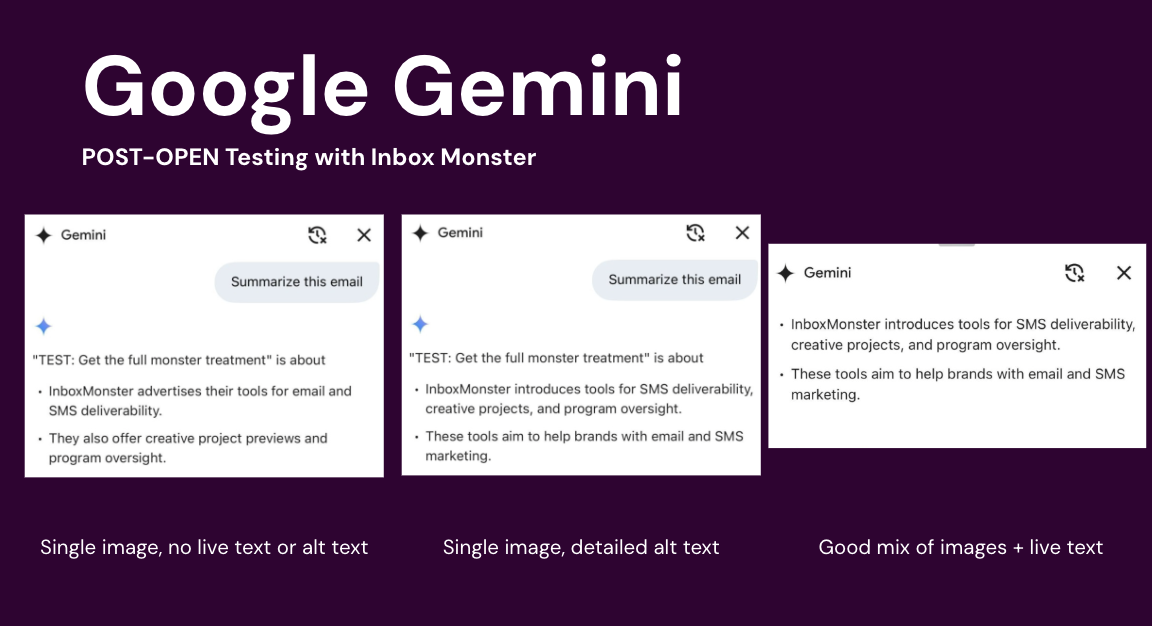
AI surfaces:
- Auto summary cards on mobile
- Side panel summaries on desktop
- Deal annotations
"We were shocked at how accurate Gemini could be with summarizing complex, multi-topic messages. It's almost too good." ~ Beth Kittle, Email Deliverability Consultant, Twilio SendGrid
Yahoo: Message Summary
Yahoo highlights key information in messages, such as dates, times and action items. Sometimes, it replaces subject line and preview text with summarized threads.
AI surfaces:
- Message summaries
- Suggested tasks
- Calendar event suggestions
Microsoft: Copilot in Outlook
Users click “Summary by Copilot” at the top of an email thread to generate a bulleted summary of key points, with numbered citations linking back to specific replies in the conversation.
AI surfaces:
- “Summary by Copilot” button
- Key points
- Citations linking to thread replies
Apple: Apple Intelligence, iOS 18.2+
Apple Intelligence has two modes, all on-device:
- Pre-open: AI-generated previews automatically replace your preheader text in the inbox.
- Post-open: A Summarize button at the top of each email generates a fuller summary of the message or thread.

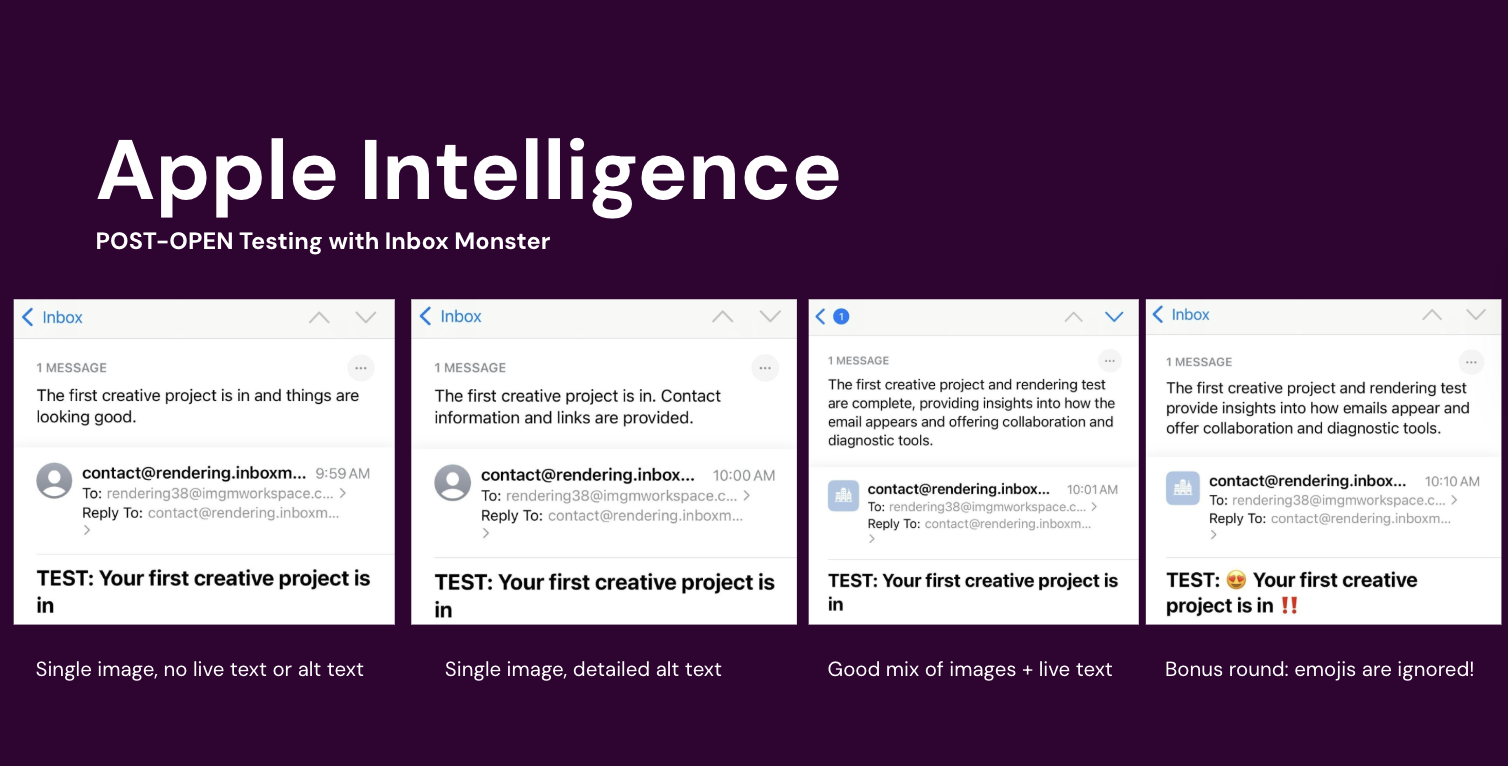
AI surfaces:
- Replaces text in inbox pre-open
- Summarize button on each email post-open
"That line of text you spent an hour workshopping? Apple might replace it with your unsubscribe disclaimer." ~ Laura Sullivan, Head of Brand & Marketing, Inbox Monster
Deliverability and Engagement Risks
The catch: Even if summaries are accurate, they change engagement. If subscribers can get what they need from a summary, they may never click through. That means skewed metrics and lost opportunities.
{{inbox-placement-insights="/blog-ctas"}}
Automatic Extractions (Yahoo & Gmail)
Summaries aren’t the only AI trick in the inbox. Yahoo and Gmail also run “automatic extractions.”
What Are Automatic Extractions?
This is when AI pulls specific elements—images, codes, links—into the inbox preview. No opt-in, no control.
The Problems Automatic Extractions Cause
It’s not all rainbows and butterflies, unfortunately. We found some issues with automatic extractions:
- Discount codes pulled from disclaimers instead of your hero offer.
- Wrong images displayed (often the second image, not the main one).
- Click attribution errors—subscribers engage with the extraction instead of your crafted call-to-action (CTA).
"Extractions can short-circuit your tracking. The click that happens in the preview may never register in your platform." ~ Laura Sullivan, Head of Brand and Marketing, Inbox Monster
See AI Summaries Before Your Subscribers Do
Here’s the good news: You don’t have to guess what your emails look like in AI-powered inboxes. Inbox Monster launched AI summary previews within the Creative Suite, giving you a front-row seat to how popular AI tools interpret your emails.
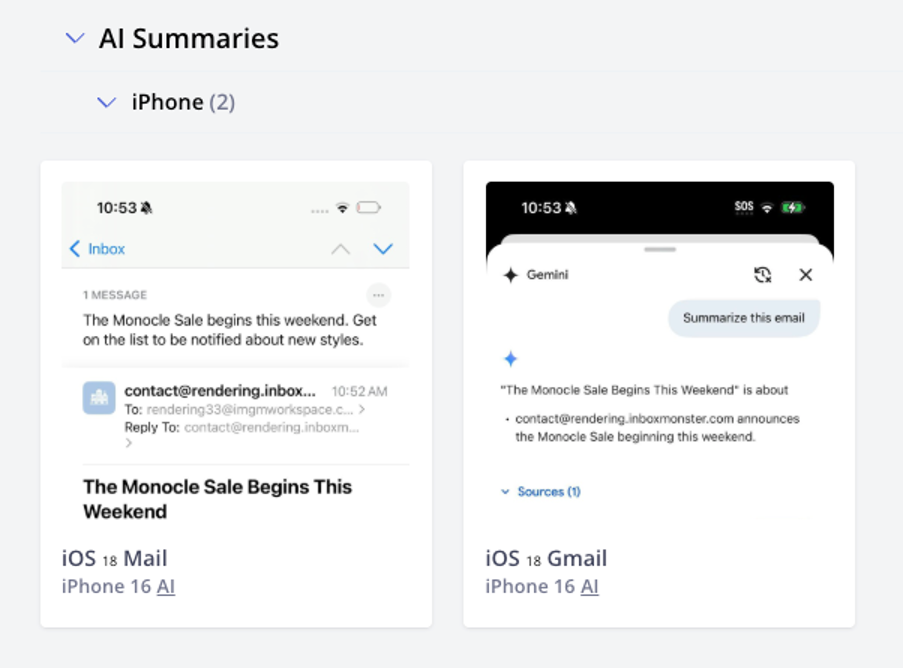
Instead of waiting for surprises in your subscribers’ inboxes, you can now see the AI-generated summaries for yourself. It’s like peeking behind the curtain: What will surface instead of your preheader text? What happens if your message leans too image-heavy?
Previewing AI summaries means you can adjust copy, design, and layout before hitting send, so you’re not writing blind.
How to Test AI Summaries in Inbox Monster
- Create a creative project: Upload your HTML or pull in creative from an ESP, just like you would for any other rendering test.
- Make sure the right previews are enabled: In the client list in the creative settings, make sure the right modern devices are checked. This unlocks previews for AI summaries, which will appear at the top of your preview list.
- Review the AI summary: See exactly how AI tools rewrite your subject, preheader and body into their two- to three-sentence snapshots. Then tweak your email until the AI surfaces what you want subscribers to see.

It’s a quick step, but it can save you from the awkward moment where Gmail decides your beautifully crafted fall promo is actually about penguins.
Best Practices for Marketers
So what do you actually do about all this? Here’s the quick-and-dirty playbook.
Don’t assume opens and clicks mean what they used to
AI summaries mean someone might read your email without technically opening it. Or they might click on an extracted discount code in a preview, bypassing your tracked CTA. That means inflated or misleading engagement data.
The fix: Look beyond vanity metrics and double down on downstream conversions (site visits, purchases, sign-ups) to gauge performance.
Re-engage continuously, not just in seasonal campaigns
AI distorts engagement signals, which can make it harder to spot when a subscriber has gone quiet. Don’t wait until holiday campaigns to clean your list.
Build in light-touch re-engagement cycles every quarter—think “We miss you” nudges, preference-center reminders, or “pick your content stream” prompts—so mailbox providers don’t assume your list is full of zombies.
Test everything, in context
Previews and summaries don’t always match what you built in your ESP. Inbox Monster’s preview tools can show you how AI tools actually display your emails. Use that intel to A/B test copy placement, schema markup and design balance. The more you test, the more you’ll understand what AI is likely to surface and how to work with it instead of fighting it.
Don’t Let AI Rewrite Your Story
Picture this: You’ve spent hours writing the perfect email. The subject line sings, the hero image pops and the CTA is irresistible. You hit send, feeling like a rockstar, only to find Apple rewrote your headline, Gmail pulled your disclaimer into the preview and Yahoo swapped your hero image for the random stock photo in your footer.
Frustrating? Definitely. The end of email? Not even close.
AI in the inbox is just the next chapter of an old story: inbox providers changing the rules, and marketers figuring out how to play smarter.
Remember when MPP upended open rates? The marketers who adapted—who focused on clicks, conversions and better audience targeting—came out stronger. The same is true now.
Instead of panicking about what you can’t control, lean into what you can. Test how your emails render. Front-load the message you most want AI to pick up. Use schema and annotations to guide what gets extracted. Balance creativity with clarity.
"AI isn't going away. But if you know how it sees your emails, you can design for both humans and machines—and that's a huge advantage." ~ Laura Sullivan, Head of Brand and Marketing, Inbox Monster
That’s the mindset shift. Don’t think of AI summaries as your enemy. Think of them as another gatekeeper you have to win over. And the brands that adapt fastest won’t just protect their deliverability—they’ll protect their voice, their revenue and their relationship with subscribers.
Inbox Monster can’t stop Apple or Gmail from rewriting your emails. But it can give you the superpower of seeing those rewrites before your subscribers do. And once you know what the inbox sees, you can take back control of your story.
{{closer-look="/blog-ctas"}}
FAQs About AI and the Inbox
What are the different ways my email is changed by AI?
Mailbox providers can generate summaries, pull snippets for previews or extract codes and images. Apple and Gmail handle this differently, but both can rewrite or repurpose your content before the subscriber sees it.
How can I stop AI from changing my emails?
Short answer: you can’t. But you can influence it. Using schema markup, annotations and smart design choices helps guide what AI surfaces.
How much of my audience is impacted by inbox AI?
A lot. Apple Mail on iOS 18 already impacts over a third of iPhone users. Gmail’s Gemini is smaller today, but there are over 1.8 billion Gmail users worldwide, so the long-term impact is massive.
Do I have any control over AI summaries?
Some. You can’t disable summaries, but testing with previews, prioritizing live text and front-loading critical info increases the chances AI highlights what you want.
Will Gmail annotations work outside the Promotions tab?
Right now, annotations mainly work in the Promotions tab. But given Gmail’s history, features often expand over time. Build for it now, so you’re ready.
Are AI extractions pulling codes from disclaimers?
Yes, and that’s the headache. AI isn’t great at context. That’s why it’s essential to structure your email so the “real” codes are obvious and easy for AI to grab.
Will AI replace subject lines or preheaders?
Not entirely. Subject lines and preheaders still matter for inbox placement and engagement. But they’re no longer the only story—AI summaries can override them.
Do AI updates only affect retail and e-commerce brands?
Nope. Any brand sending promotions, account updates or newsletters can be impacted by AI. If you email, you’re affected.