You know your marketing emails are full of irresistible offers and valuable content—but you’re still getting spam complaints and unsubscribes. So what gives?
Chances are, your subscribers’ inboxes are simply overstuffed. Consumers regularly opt out when they receive too many messages from the same brand, with 56% unsubscribing if they receive four or more messages within a 30-day period.
To keep your mailing list growing instead of shrinking, you need to tailor your campaign delivery to your subscribers’ preferences.
How can you sidestep the spam button and not only keep your customers, but also get them excited about seeing your emails in their inboxes? Preference centers are your secret weapon.
Here’s the TL;DR
Disengaged users drag down campaign performance and lead to email deliverability issues. This guide will show you how to use preference centers to:
- Protect deliverability (and revenue)
- Combat unsubscribes
- Leverage zero-party data to drive engagement
You’ll discover the right techniques for setting up a preference center that keeps your subscribers tuned in to your campaigns, helps curb spam complaints and maintains a strong sender reputation.
The Monster Guide to Preference Centers: How to Fill Customers’ Inboxes With Content They Actually Care About
Give the people what they want—and protect your profits
Today’s shoppers want their inboxes to be as well-curated as their closets—and mailbox providers are serving as bouncers to ensure red-carpet service. That means if your brand isn’t delivering a premium experience that matches your users’ needs, you’re likely to end up kicked to the curb (aka the spam folder).
To avoid that dismal fate, you’ll need to level up your user experience.
Mailbox providers are prioritizing the user experience
If your brand wants a shot at the spotlight, you’ll have to please the inbox gods. Gmail, Yahoo, Microsoft, and other ISPs have all implemented technologies that help ensure users will have a zen-like experience every time they open their inbox, with sophisticated prioritization, spam filtering and easy opt-out capabilities.
Nowadays, customers won’t stay on your list out of inertia. When unsubscribing is easier than ever, you need to give them a compelling reason to stay.
Building customized experiences for subscribers keeps them engaged and stops them from hitting the spam button
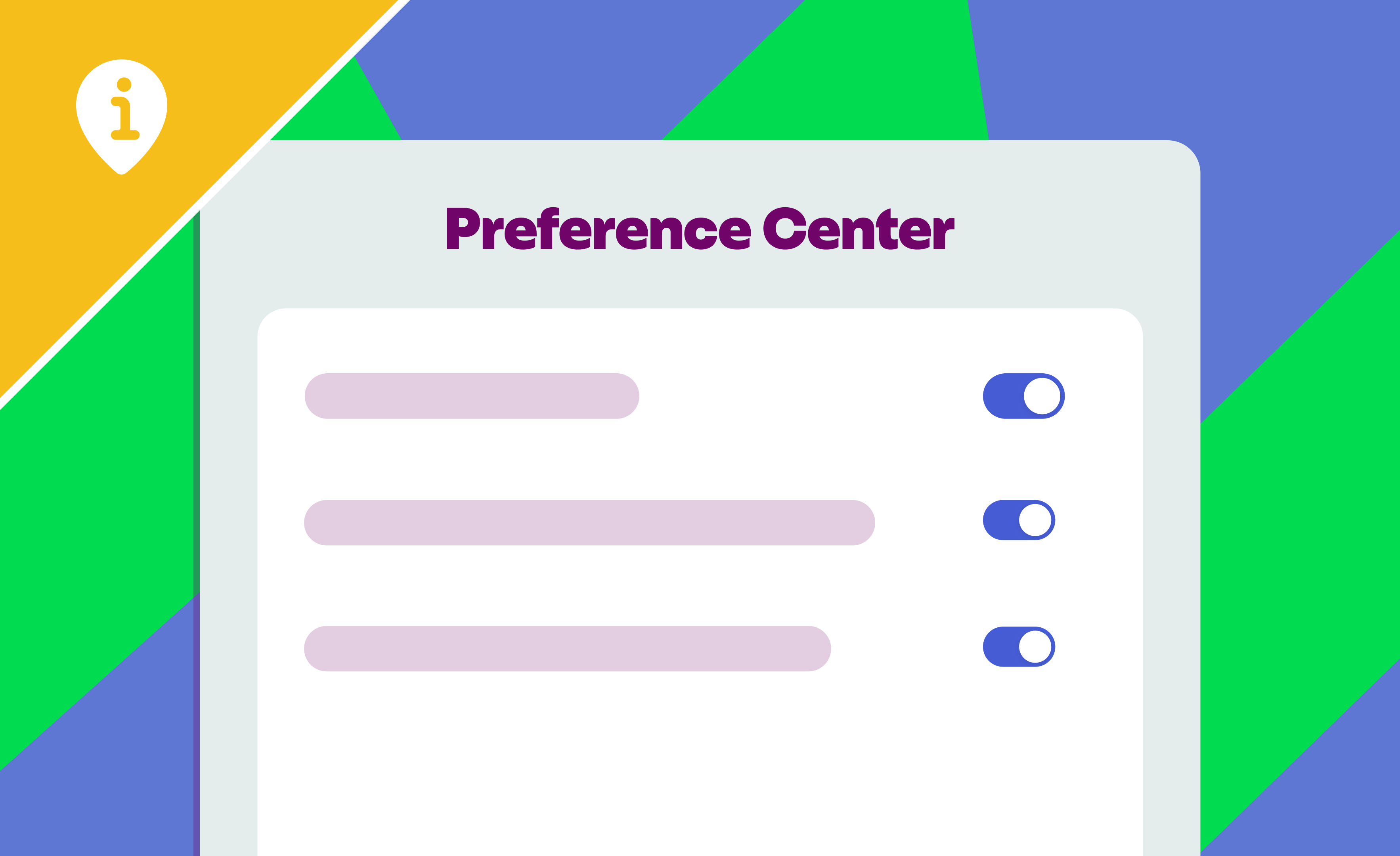
Preference centers are your primary tool for creating a user-friendly experience. You can use templates provided by your email service provider (ESP) to set up email frequency and other options for customization based on each subscriber’s specific needs.
By giving each subscriber the unique experience they want to have with your brand, you’ll keep them engaged and looking forward to your next message.
Use your preference center as a tool for revenue protection
Marketers are struggling to get eyes on their campaigns: When we look at industry benchmarks for over 5 million sends from a recent 30-day timeframe at the largest global ISPs–Gmail, Outlook, AOL, Yahoo and iCloud–the overall inbox placement rate across all industries is 79.1%, with 17.44% of emails being marked as spam and another 3.46% going missing.
This, unfortunately, misses the mark on what constitutes a healthy email program. The team at Inbox Monster, and email experts at large, define high inbox placement as ideally in the mid-90s or higher. Anything consistently below that indicates a deliverability problem that needs to be addressed.
“To quantify the impact of inbox placement on your bottom line, consider this: For every percentage point of inbox placement represents real subscribers you either reach or lose. If you send to a list of 1 million contacts, and your inbox placement is 90% instead of 95%, that’s 50,000 people who never even see your message. That’s potentially tens of thousands of lost revenue from a single campaign. Suddenly, inbox placement becomes one of the most important email marketing metrics you can track.” ~ Bob Stocks, Email Deliverability Consultant at Inbox Monster
Customizing your messaging approach based on users’ preferences will send positive signals to mailbox providers that help you improve inbox placement—making it easier to get clicks on your content that translate directly into new revenue.
{{demystify-deliverability="/blog-ctas"}}
Your Brand vs. Gmail Subscription Settings
It’s time for a showdown: Your brand vs. Gmail’s “Manage Subscriptions” feature. Who will win?
Opting out is easier than ever with Gmail’s Manage Subscriptions
Gmail holds about a quarter of the world’s market share when it comes to email clients—meaning that a sizable chunk of your audience will have access to their new “Manage Subscriptions” feature. That means subscribers don’t even have to open your emails to unsubscribe. They can see how often you send messages and unsubscribe with one click.
When it’s so easy to leave, how can you convince them to stay?
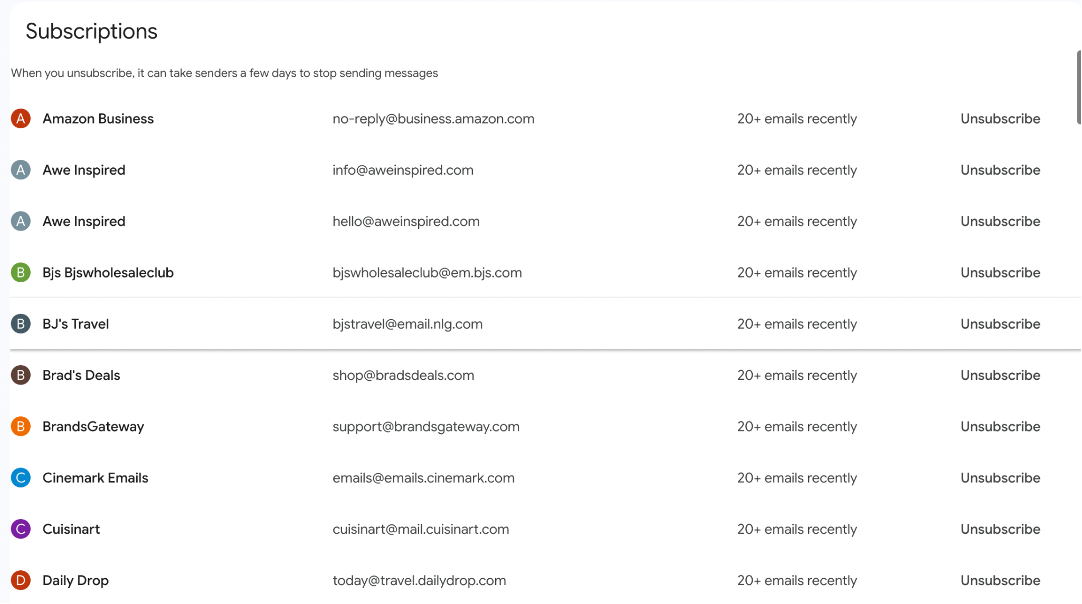
Use a preference center to deliver the exact content subscribers want so they’ll stick around
More than half of email subscribers opt out because they receive messages more often than they’d like. Giving your subscribers options such as daily, weekly, or biweekly messages ensures your message frequency aligns with their expectations. Customizing content types (such as flash sales vs. a blog newsletter) also keeps your subscribers more engaged, so they won’t drop off due to irrelevant content.
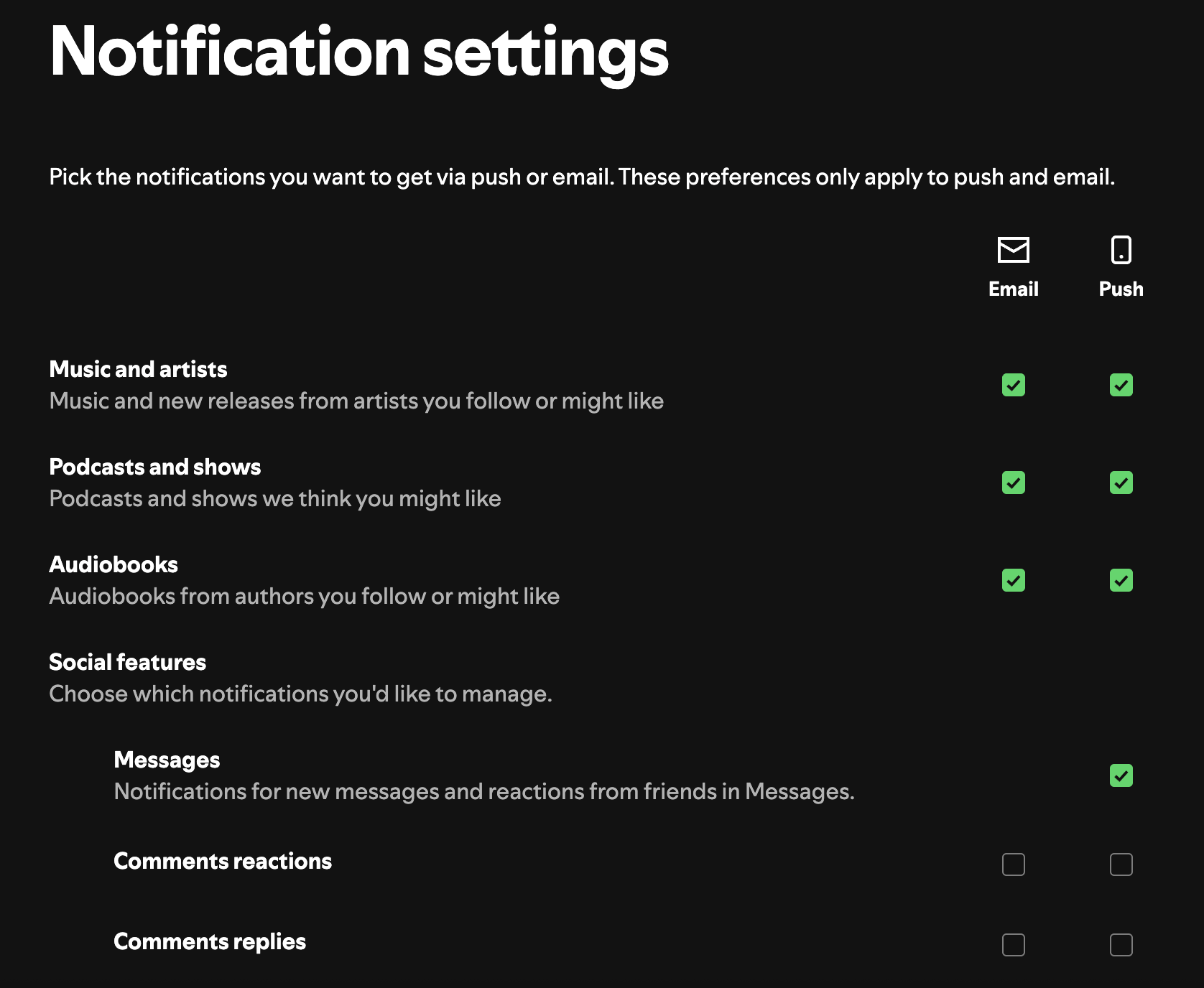
Case in point: Spotify knows users consume all different kinds of content on their platform, from music to audiobooks to podcasts—so not everyone will be interested in the same things. Their preference center enables listeners to select which categories they’d like to receive notifications about, as well as options for receiving or muting notifications about messages, comment reactions, and comment replies. Users can also select how to receive notifications, whether via email or mobile push notifications.
Segment your lists with specific headers to limit damage from unsubscribes
Including a “master unsubscribe” button at the bottom of the message is important to ensure your brand is compliant with laws, such as the CAN-SPAM Act. But what if your subscribers just want to opt out of one type of campaign?
To that end, you can employ segmented List-Unsubscribe headers for specific types of communication (promotional emails, newsletters, etc.), rather than automatically unsubscribing users from all messages, limiting fallout when subscribers hit the button.
Protecting Deliverability With a Preference Center
Try these preference center strategies to prime your campaigns for inbox success.
Opt-down vs. opt-out: Using frequency controls to reduce spam complaints
Pay attention to the subscribers who rarely, if ever, open your emails. They’re at greatest risk of marking them as spam without notice. To reduce those odds, send them an email asking if they’d like to decrease the frequency of your emails. They’ll be able to customize their mail schedule so that they can keep up, driving greater engagement and helping you avoid spam complaints.
Just hit snooze: Pause emails to prevent permanent churn
Sometimes, a subscriber isn’t opening your messages because they’re traveling or overwhelmed with life in general. But that doesn’t mean they never will again.
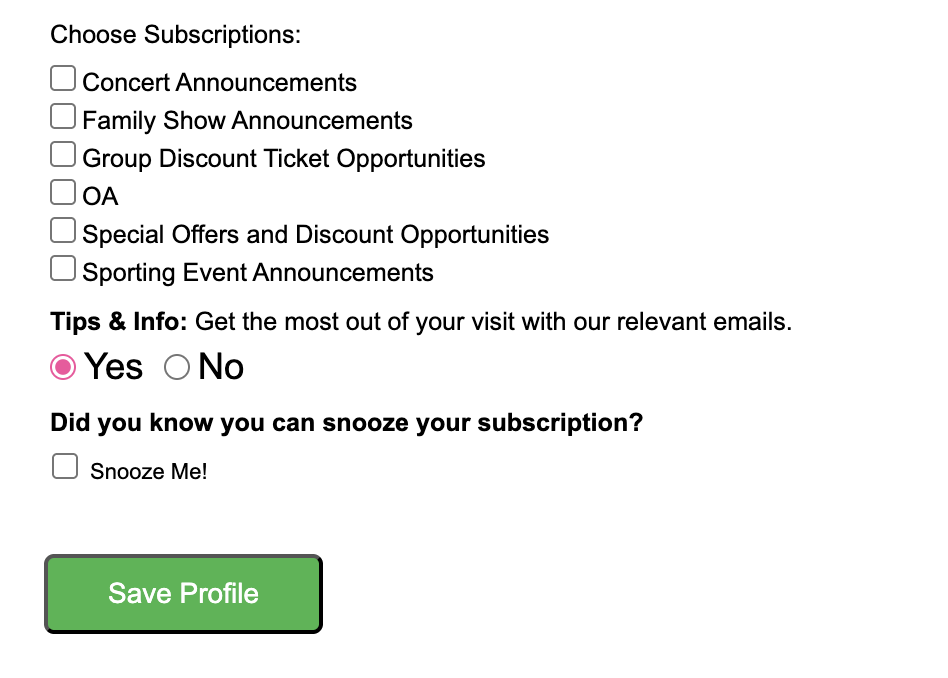
Along with the option to decrease frequency, give your subscribers the opportunity to hit the “snooze” button on your messages, as Ticketmaster does. Recipients will have a chance to clear their inboxes and return refreshed at the end of their break—rather than opting out for good.
Discover how preference center changes impact inbox placement
To measure the impact of your preference center, monitor your before-and-after metrics.
For instance, is engagement (email open/click rate) trending higher after implementing a preference center? Are you seeing fewer spam complaints?
Positive trends are likely to improve your sender reputation. You can use inbox placement testing tools like Inbox Monster to measure the impact on email reputation and deliverability.
{{inbox-placement-insights="/blog-ctas"}}
The Power of Zero-Party Data
To deliver true customization to the email experience, you’ll need to tap into the right intel. It’s become more difficult to gather data from third-party tracking cookies thanks to recent browser changes that prioritize user privacy, but let’s not neglect your low-hanging fruit: Asking your customers directly.
Give your customers control: Use zero-party data to learn about your subscribers
Using your preference center to collect zero-party data from your customers gives your brand firsthand insights about what subscribers want.
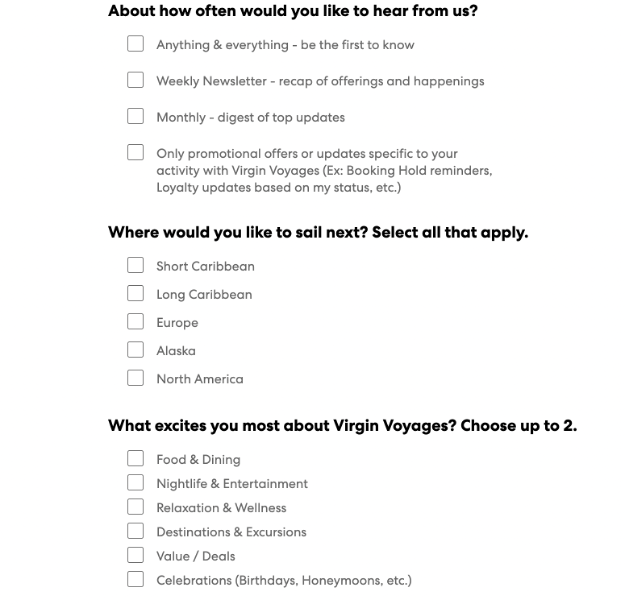
For example, Virgin Voyages collects subscriber data to learn about which cruise destinations they’re interested in, what they value most in a cruise journey, and how often they’d like to receive messages. The brand then uses this data to deliver highly personalized email and SMS campaigns that cater to each subscriber’s unique interests and preferences.
How personalized comms elevate your CX
Virgin Voyages and other brands are using advanced personalization tools to send compelling email and SMS campaigns that drive engagement, with higher click-through rates and conversion rates than generic campaigns. For Virgin Voyages, that’s resulted in a record-breaking 60% YoY growth, with sold-out bookings for Q1 2025.
{{virgin-voyages="/blog-ctas"}}
Better engagement → a better sender reputation
Using zero-party data to create personalized marketing campaigns helps you build stronger relationships with your customers, boosting revenue.
But it also helps extend your reach: The more customers interact with your emails, the more likely those messages are to land in the inbox rather than in spam.
Tips for Building the GOAT of Preference Centers
Ready to boost your sender reputation? Here’s what you’ll need to build a best-in-class preference center.
Brand your center for a cohesive experience
Keep it cute! Your preference center should use the same logos, fonts, colors, and branding as the rest of your site to maintain a unified look.
Provide options: Content themes, types, and frequency
Make sure your preference center options make it easy for subscribers to get the content that matters to them.
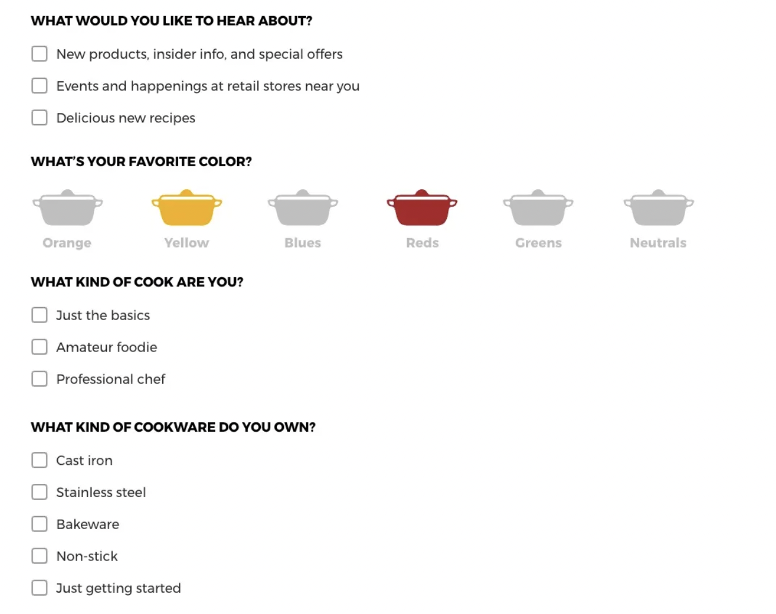
Cookware brand Le Creuset’s email campaigns include promotional offers, cookware cleaning tips, recipes, and more—but they don’t presume their subscribers are interested in everything they have to offer. Instead, they use their preference center to ask about color and content preferences and to segment their lists by audience type, so they can send different campaigns to novice home cooks vs. professional chefs, for example.
Choose your channel: Enable multiple notification methods
Some subscribers want your content, but they hate digging around in their inbox to find it. No problem: You can enable them to switch from email to SMS alerts or push notifications, so they can choose the medium that best fits their needs and lifestyle.
Accessibility is not optional
Finally, realize that your subscribers have different needs. Some may be vision-impaired or prefer Dark Mode; some may be using Gmail on their desktops, while others are checking their Outlook inboxes on their iPhones. Your preference center needs to be fully accessible to every user, regardless of how they access your site.
To ensure you’re building a great experience for everyone, conduct rendering tests to see how your emails and your preference center webpage display across different devices and email clients, and act fast to fix any errors.
Boosting Your Email Reputation Starts With a Preference Center
Strong sender reputations don’t come overnight. They require a tailored strategy that includes email rendering and testing to ensure accessibility across all platforms, email suppression techniques to reduce spam complaints, and, critically, a preference center to ensure your subscribers receive the right content to meet their needs.
Proactive inbox management keeps your sender rep high
By empowering subscribers to set their own content preferences and frequency, you’ll improve engagement signals, which are the main factors ISPs use to determine your sender reputation. A high sender reputation directly translates into better deliverability and helps ensure your content arrives in the inbox.
A personalized inbox experience boosts retention and CLTV
When subscribers tell you exactly what they want—from content themes and message types to channel preferences—you can deliver a tailored experience that transforms passive subscribers into active consumers. That means more engagement and stronger customer loyalty.
The right technology generates real results from your email program
While your preference center is important, keep in mind that it’s just one element of a robust email program. By leveraging best-in-class technology like Inbox Monster to help you build and manage your campaigns, you can ensure an engaging inbox experience that boosts your sender reputation.
Inbox Monster’s suite of features includes accessibility email checks, automatic language translations, AI summaries and content analysis that checks for issues across different browsers and ISPs. By using its powerful lens to evaluate your campaign content and optimizing your strategy accordingly, you’ll be primed for increased engagement, improved deliverability, and higher revenue from your campaigns.
{{deliver-more="/blog-ctas"}}
FAQs About Preference Centers
What is an email preference center?
A preference center is a tool that encourages subscribers to set their email preferences for frequency, content types, and accessibility options, creating a more user-friendly experience.
What are the benefits of having a preference center?
The main benefits of an email preference center include:
- Protecting deliverability and revenue
- Combating unsubscribes
- Leveraging zero-party data to drive engagement
- Building customized, user-friendly experiences for subscribers
How does a preference center help protect email deliverability?
By optimizing the user experience for each subscriber, a preference center reduces the likelihood that subscribers will report messages as spam or unsubscribe, thereby protecting your sender reputation. Positive engagement signals (opens, clicks) associated with your emails are interpreted by mailbox providers as good sending behavior, which boosts your deliverability.
What is the difference between an "opt-down" and an "opt-out" in a preference center?
Opt-out is the action of unsubscribing entirely from a brand's emails, often via a "master unsubscribe" button.
Opt-down is an alternative option that allows a subscriber to decrease the frequency of emails (e.g., from daily to weekly) instead of unsubscribing completely.
How can a preference center be used to collect zero-party data?
A preference center collects zero-party data by asking subscribers what kind of content they’d like to receive and how often. This gives your brand firsthand insights about who your customers are and what they want from your communications.
What key options should I include in my preference center for subscribers?
Key options to include in a preference center are:
- Content themes (e.g., Food & Dining, Nightlife & Entertainment)
- Content types (e.g., promotional offers vs. a regular newsletter)
- Frequency (e.g., daily, weekly, monthly)
- The option to swap out an email for an SMS opt-in (or receive both)
How does a preference center help reduce spam complaints?
An email preference center reduces spam complaints by empowering subscribers to customize their experience (e.g., frequency and content types), ensuring they are not overwhelmed by irrelevant content. Opt-down and snooze options reduce the risk that disengaged users will report your message rather than politely unsubscribe or decrease frequency.